Logo
The Metropolia logo consists of the Nousukierre symbol and the Metropolia wordmark.
The primary version of the logo is the orange–grey version used on a light background. In marketing and communications, other versions may be used in a controlled manner, such as the orange–white version or the all-white version.
Metropolia Orange #FF5000
Metropolia Grey #53565A
A clear space has been defined for the logo. No other graphic or textual elements may be placed within this area.
The clear space is included in the original logo files. The size of the clear space is based on the height of the letter M in the Metropolia wordmark.

Logo Versions
The logo is available in different versions for various background colours, as well as in a version that includes the higher education institution’s English name.
A) Orange–Grey
B) Orange–White
C) White
D) Orange–Grey
E) Orange–White
F) White
G) White
H) Secondary Colours – 50% Fill
I) Very Light and Clear Photograph*
J) Metropolia Grey
K) Orange
L) Dark Colours, e.g., in Partner Materials
M) Dark and Clear Photograph*
*The logo may be used on photographs only in special marketing and communications cases – not in regular use.

Logo Layout and Placement
These layout guidelines apply to all logo versions.
For international use, the English logo version is used.
The logo should be placed according to the instructions provided. By default, the logo occupies a header or footer position and should never be the main visual element.
Any partner logos should be sized at 50% of the Metropolia logo and positioned in a different corner of the application.
1. Small Applications
The logo’s clear space serves as the margin in small applications.
2. Large Applications
In larger applications, the margin should be twice the clear space.
3. Partner Logo Placement
The partner logo should be positioned in the top-right corner.

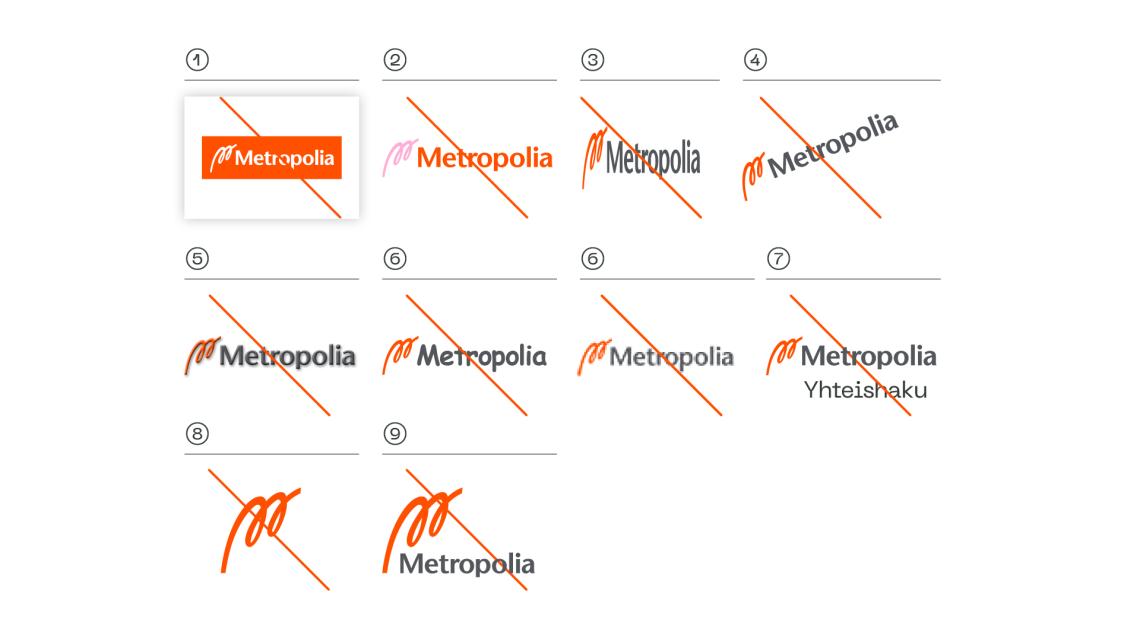
Incorrect Usage of the Logo
Only the provided original logo files may be used. The logo must not be altered or recreated.
- Do not place the logo on a “colour block.”
- Do not alter the logo colours – not even with brand or secondary colours.
- Do not distort the logo’s proportions.
- Do not tilt or rotate the logo.
- Do not apply shadows or other effects to the logo.
- Do not change the logo font.
- Ensure adequate resolution. Always use vector files (PDF, SVG) whenever possible.
- Do not create combination logos by adding messages or other elements to the logo.
- Do not separate the Nousukierre symbol from the logo. It may only be used as an avatar symbol on social media.
- Use only the official logo versions.
Download the Logo
Questions About Logo Usage?
Contact Metropolia Communications at: marketing [at] metropolia.fi (marketing[at]metropolia[dot]fi)


